Your contact information and notifications for an organization
How do I receive notification messages for an organization?
Follow these steps:
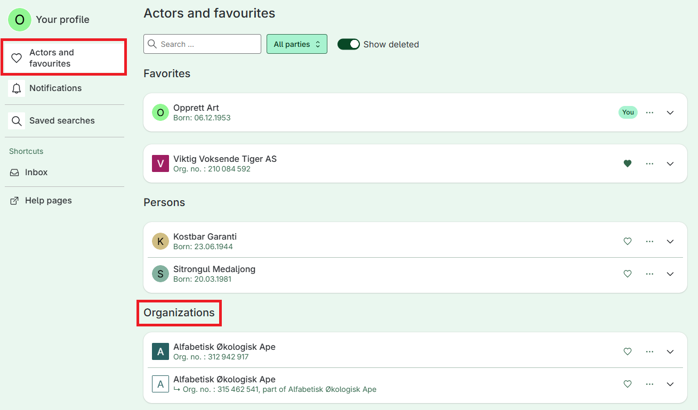
Go to Menu and select Your profile
Select Actors and favorites
Under Organizations:
Select the relevant organization
Click on Add
Enter the mobile phone number and/or email address you want to receive notifications for
Confirm the email address or mobile phone number
How do I receive notifications only for single services?
You can choose to receive notifications only for single services in Altinn. To use this feature, you must first confirm at least one notification address, either a mobile phone number or an email address.
Follow these steps:
Go to Menu and select Your profile
Select Actors and favorites
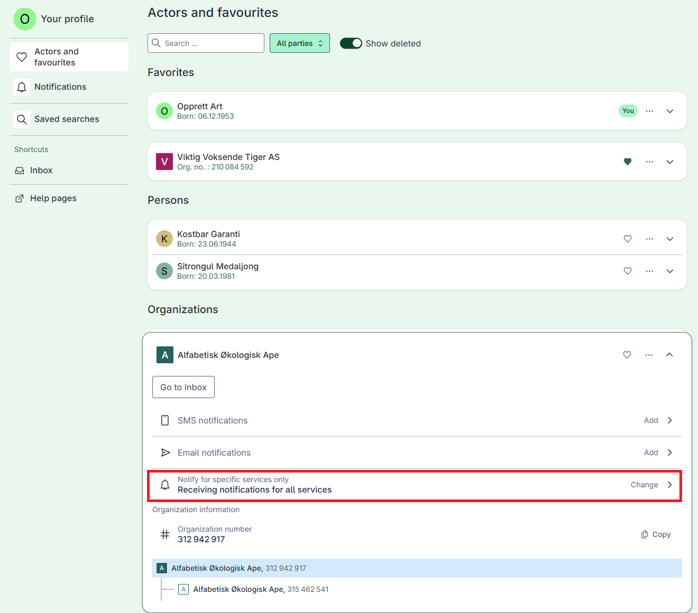
Under Organizations, select the relevant organization
Under Receiving notifications for all services, select Change
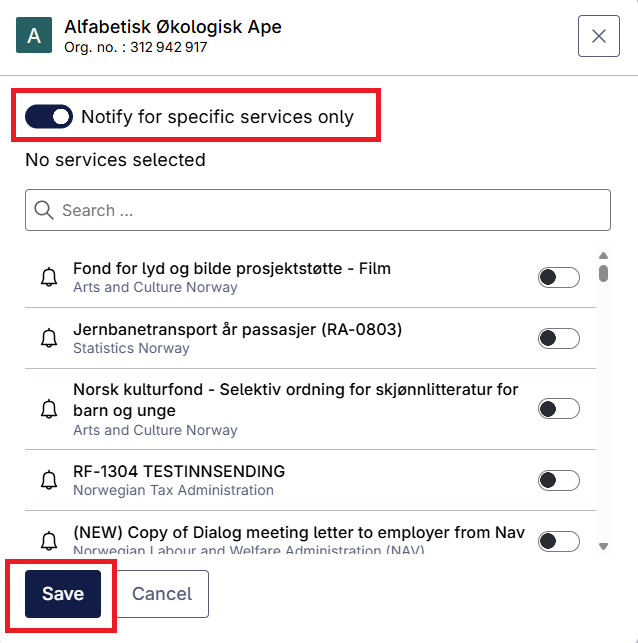
Select the single services you want to receive notifications for
Select Save
If you do not see the option to receive notifications for specific services, it is usually because your notification address has not yet been confirmed.
Important
The option to receive notifications for single services is available only after you have confirmed at least one notification address.
If you have not confirmed a mobile phone number or email address, this feature will not be available.