Profile settings and contact information
How do I set a preselected actor?
This guide shows how to select a preselected actor in Your profile, so you do not have to switch actors every time you use Altinn.
Follow these steps:
Go to Menu and select Your profile
Select Actors and favorites
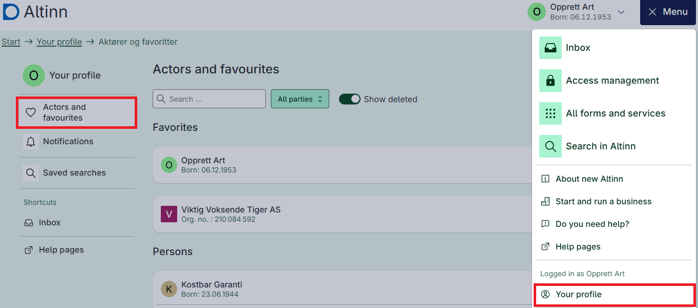
Find the organization or private individual you want to set as your preselected actor
Select the three dots to the right of the actor
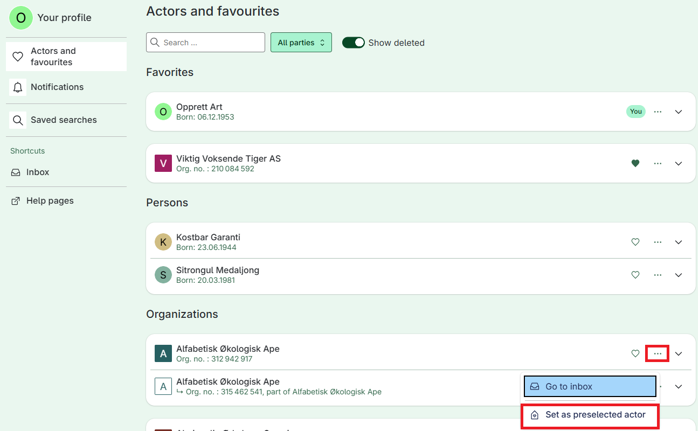
Select Set as preselected actor
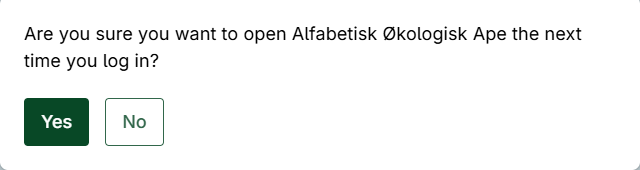
Confirm
The selected actor will then appear under Favorites
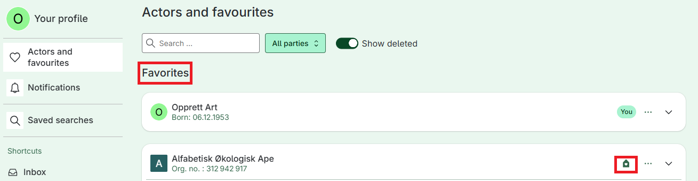
The next time you log in to Altinn, this actor will be selected automatically.
Preselected actor in Your profile
You can select a preselected actor in Your profile.
This means that Altinn will automatically open with the selected organization or role when you log in, so you do not have to switch actors every time.
This is especially useful if you often work on behalf of the same organization.
What does preselected actor mean?
The preselected actor is the organization or your role as a private individual in Altinn that Altinn automatically selects when you start a new session.
You can still switch actors at any time
The change only applies to you and your user account
The selection is saved until you change it again
You can set a preselected actor if you:
have access to more than one actor in Altinn
for example, represent several organizations, or both yourself as a private individual and an organization
A preselected actor can be useful if you:
often work on behalf of one specific organization
want faster access to the right services
want to reduce the risk of performing actions on behalf of the wrong actor